Welcome to my blog..
today i want to talk About how to do in the procedure text.
procedur text
Procedure text is a text that explains or helps us how to make or use something. Its social function is to describe how something is completely done through a sequence of steps. Communicative purpose of this text is to describe how something is made through a sequence of actions or steps.
Purpose of Procedure Text
– To explain/tell (the reader) how to make/operate/do something through a sequence of actions or steps.
– To explain steps/instruction to make/operate/do something
Language Feature of Procedure Text:
– Use adverbial of sequence / Using temporal conjunction (e.g: first, second, third, the last)
– Use command / imperative sentence (e.g : put the noodles on the . . ., cut the onion. . ., wash the tomatoes. . . )
– Using adverbials (Adverbs) to express detail the time, place, manner accurate, for example, for five minutes, 2 hours, etc.
– Using action verbs, e.g : make, take, boil, cook
– Using Simple Present Tense
How to Refresh iPhone Memory without Rebooting
As stated above, your memory is cleared when you power your iPhone off and on. And when your iPhone is crashing, restarting your iPhone should almost always be the first trick you try. However, if your iPhone has been slow to respond or your apps keep crashing, you may want to try this trick before you go through the trouble of a full power down and power up. Doing so will help to speed up your iPhone and prevent further memory problems. This trick goes all the way back to the iPhone 4, so whether you’ve got an iPhone 5, iPhone 6 or 6s, iPhone SE, iPhone 7, iPhone 8, or iPhone X, you should have no problems refreshing your iPhone in this way. It should also work to speed up your iPad too. To do this:
Master your iPhone in one minute a day:
Sign up to iPhone Life's Tip of the Day Newsletter and we'll send you a tip each day to save time and get the most out of your iPhone or iPad.
Sign up to iPhone Life's Tip of the Day Newsletter and we'll send you a tip each day to save time and get the most out of your iPhone or iPad.
How to Refresh iPhone 7 & Older iPhone
With your iPhone unlocked, press the Side Button (Sleep/Wake button) until a screen pops up telling you to slide to power off with a Cancel button at the bottom. Release the Sleep/Wake button.
*Note: The Sleep/Wake button may be in a different place than pictured if using an older iPhone.
With your iPhone unlocked, press the Side Button (Sleep/Wake button) until a screen pops up telling you to slide to power off with a Cancel button at the bottom. Release the Sleep/Wake button.
*Note: The Sleep/Wake button may be in a different place than pictured if using an older iPhone.

From here, press and hold the Home button until your device returns to your Home screen.
Then release your Home button, relaunch whatever app was crashing, and feel the difference in response time and speed.
If your iPhone is still crashing, give it a complete restart by holding down the Sleep/Wake button and sliding to power off. To turn it back on, press and hold the Sleep/Wake button again.
How to Refresh iPhone 8 & iPhone X
Apple did away with the Home button starting with the iPhone X, which means the instructions above won't work on the iPhone X or the iPhone 8 and 8 Plus, even though the iPhone 8 models still have a Home button. Fortunately, there is an easy way to refresh your iPhone X or 8 using the Settings app.
- First, you will need to turn on Assistive Touch. Go to Settings > General > Accessibility > Assistive Touch and toggle Assistive Touch on. A gray and white button will appear on the screen. The button can't be captured in a screenshot.


- Next, return to the General page in your Settings app.
- Scroll down to the bottom of the General menu and tap Shut Down.
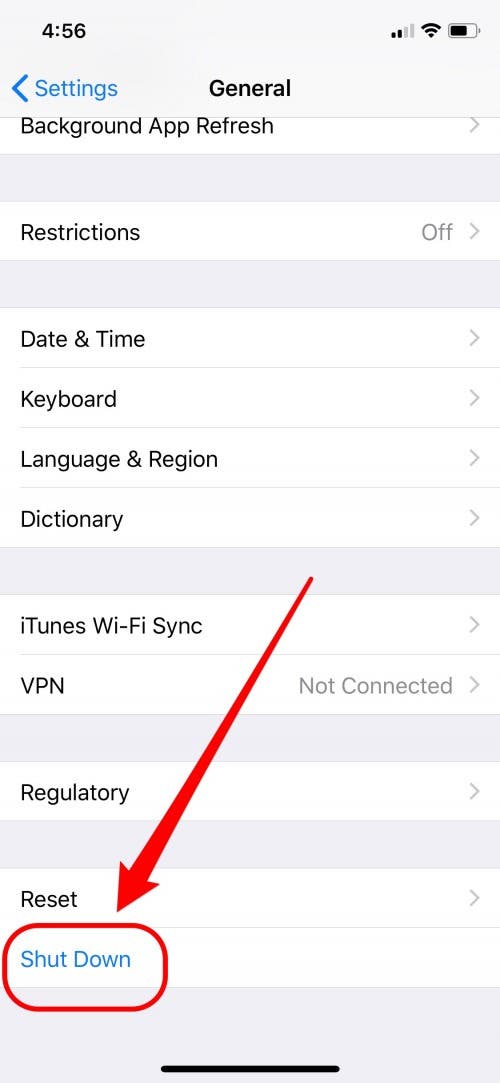
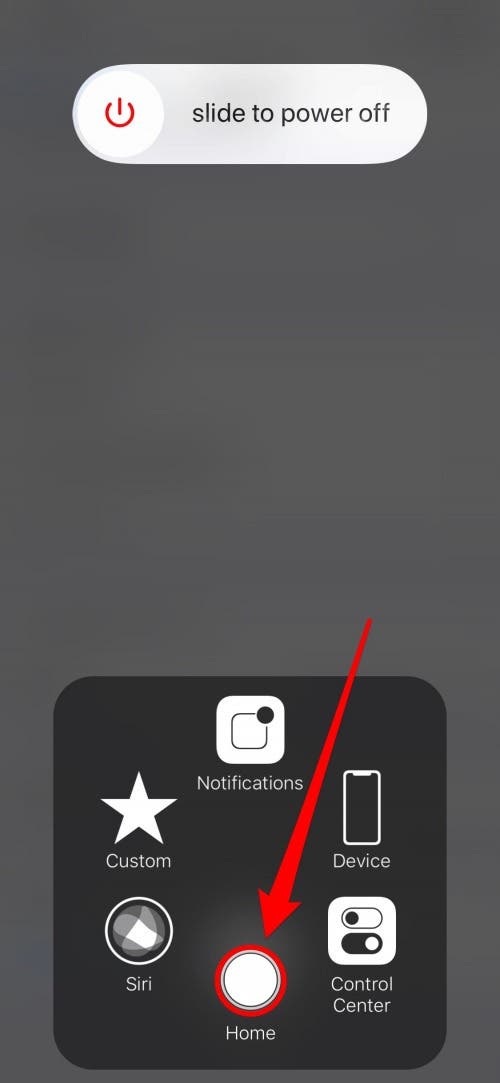
- A screen should pop up telling you to slide to power off with a Cancel button at the bottom.

- Tap on the Assistive Touch button and then press and hold on the on-screen Home button until your iPhone returns to the Home screen.
Need more iPhone speed? Check out the extra tips below.
Komentar
Posting Komentar